
ガイド
FitMesh Syncとは・仕組みと使い方
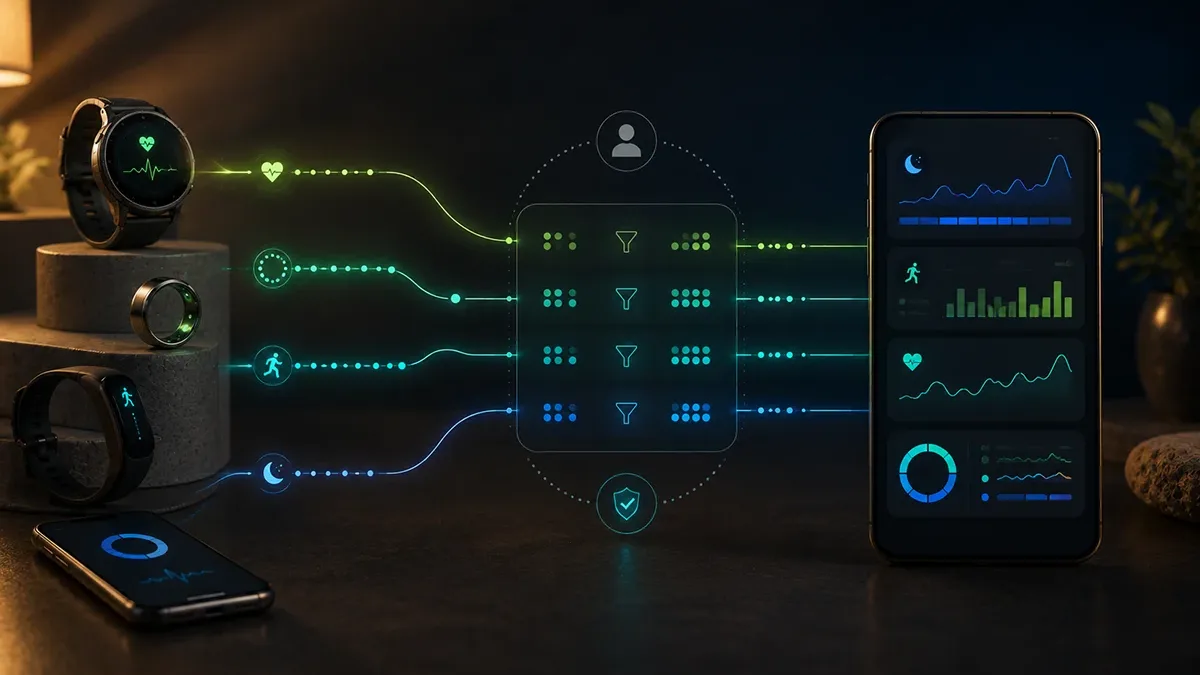
FitMesh Syncはリング、スマートウォッチ、フィットネスアプリが提供するデータをアプリ内で統合します。機能、メーカー製アプリに残る情報、始め方を解説します。
まとめ
- 複数のデバイスのフィットネスデータを1つのアカウントに集約するiPhoneおよびAndroid向けアプリ。
- Apple ヘルスケア、Health Connect、互換性のあるColmiリングをBluetooth経由で読み取ります(許可したデータのみ)。
- 複数のソースが同日の歩数を記録している場合、合計を加算せず1つの歩数を表示します。
- 無料ダウンロードと14日間のPro試用。終了後にPro機能を使い続けるには購入またはサブスクリプションが必要です。
- 個人用のウェブダッシュボードはまだ利用できません。 データはiPhoneおよびAndroidのFitMesh Syncアプリ内のダッシュボードで確認できます。
FitMesh Syncとは
FitMesh SyncはiPhoneとAndroid向けのアプリです。時計、リング、フィットネスアプリがApple ヘルスケアやHealth Connectに保存したデータを読み取り、互換性のあるColmiリングとはBluetoothでも直接接続します。アプリ内ではそれらを日ごとにまとめて表示します。Apple ヘルスケアおよびHealth Connectからは、許可したデータタイプかつソースが実際に書き込んだデータのみを読み取ります。
解決する課題と対象ユーザー
夜はリング、昼は時計を使用している方や、iPhoneとAndroidスマートフォンを併用している方など、複数のデバイスを使うユーザー向けに設計されています。データをまとめるアプリがないと、記録は異なるアプリに分散し、スマートフォンが2台ある場合は2つのプラットフォームに分かれてしまいます。
同じアカウントを使えば、接続環境と試用期間またはProなどの有効なアクセス権がある限り、スマートフォンを切り替えた場合も含め、各端末が他の端末から同期されたデータを表示します。
収集されるデータとアカウント削除の申請方法については、プライバシーポリシーおよびアカウント削除ページ(英語)をご覧ください。
対応する指標の収集と統合の仕組み
FitMesh Syncは3つの経路からデータを収集します。
| 経路 | プラットフォーム | 必要な条件 | 取得されるデータ |
|---|---|---|---|
| Bluetooth経由のColmiリング | iPhoneおよびAndroid | 互換性のあるColmiリング、有効なBluetooth、アプリからの接続。Apple ヘルスケアやHealth Connectは経由しません。 | リングが記録し、アプリが使用中のモデルから読み取れる指標。 |
| Health Connect | Android | 選択した種類の許可。データを記録するデバイスまたはアプリがHealth Connectに書き込む必要があります。 | ソースが書き込んだ許可済みの種類。 |
| Apple ヘルスケア | iPhone | 選択した種類のアクセス権。データを記録するデバイスまたはアプリがApple ヘルスケアに書き込む必要があります。 | ソースが書き込んだ許可済みの種類。 |
1日は各デバイスの合計を加算したものではありません。FitMeshはデータを日ごと・ソースごとにグループ化し、指標ごとに異なるルールで統合します。
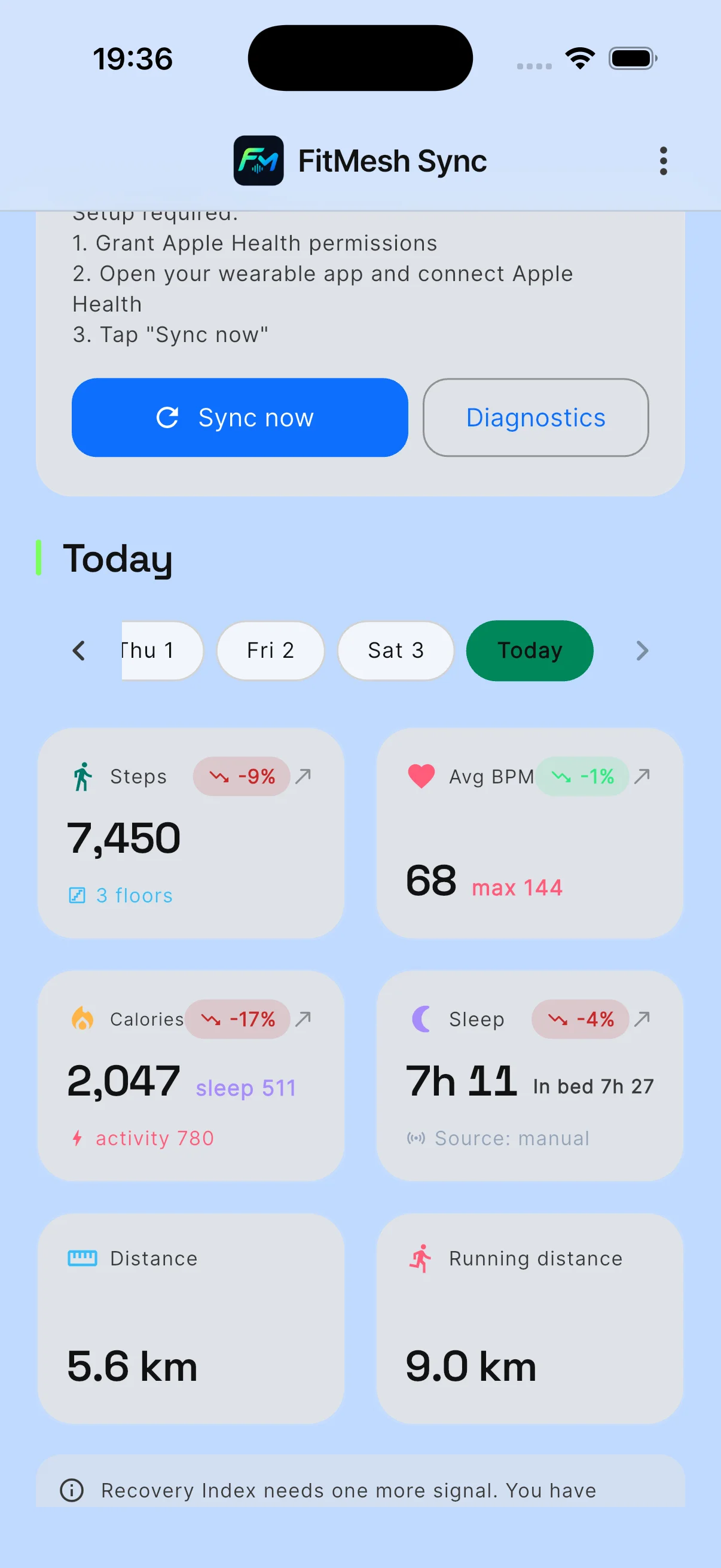
- 歩数。 同じ日に複数のソースがある場合、FitMeshは1つの歩数を表示します。データの信頼性と網羅性に基づいて自動的に選択します。Colmiリングとスマートフォンの1時間ごとのデータが一致している場合は、1時間ごとに構成することも可能です。最も高い数値を選ぶわけではありません。
- 睡眠。 1日につき1つのメインセッションを起床日に割り当てます。仮眠は個別に保持されます。
- ワークアウト。 開始時刻、終了時刻、種類が一致する場合、同じワークアウトの2つの記録が統合されます。2つのプラットフォームで記録形式が異なる場合は、2回表示されることがあります。
アプリ内の「同期センター」(メニューの「デバイスと同期」)には、各指標について前回の同期時にデータを提供したアプリが表示されます。統合された数値は論理的な選択に基づくものであり、保証ではありません。疑問がある場合はメーカーのアプリと比較してください。
メーカー製アプリに残るもの
FitMesh Syncはメーカー製アプリに代わるものではありません。それらのアプリが算出する回復度やトレーニング負荷などのスコアや指標はそのまま保持され、FitMeshはそれらをインポートしません。時計のペアリング設定や本体設定もそこに残ります。
始め方
- App Store(iOS 14.0以降)またはGoogle Play(Android 8.0以降)からFitMesh Syncをダウンロードし、「サインイン」または「アカウントを作成」をタップします。
- 時計のアプリまたはフィットネスアプリで、Apple ヘルスケアやHealth Connectへのデータ共有がまだ有効になっていない場合は有効にします。
- FitMesh Syncで読み取りを許可します。iPhoneではApple ヘルスケア、AndroidではHealth Connectへのアクセスを許可し、読み取るデータを選択します。
- 互換性のあるColmiリングを使用する場合は、Bluetoothを許可し、メニューから「スマートリング」を開いて「リングをペアリング」をタップします。
- 「今すぐ同期」をタップして最初の同期を実行します。
制限事項、ダウンロード、試用、Pro
一部の指標は対象外となります。現バージョンではFitMesh SyncはVO2 maxを表示せず、Apple Watchの手首夜間温度も読み取りません。iPhoneでの1日の移動距離はウォーキングおよびランニングの距離です。AndroidではHealth Connectからの血圧、血糖値、水分補給、栄養データを読み取りません。
ダウンロードは無料です。新規アカウントには14日間のFitMesh Pro試用が付与されます。終了後にPro機能を継続利用するには購入またはサブスクリプションが必要です。購入はアプリ内から各ストアを通じて、ストアに表示された価格で行われます。
現在データを確認できる場所
個人用のウェブダッシュボードはまだ利用できません。 データはiPhoneおよびAndroidのFitMesh Syncアプリ内のダッシュボードで確認できます。
よくある質問
FitMesh SyncはiPhoneとAndroidでどのようなデータを読み取りますか?+
iPhoneのApple ヘルスケアおよびAndroidのHealth Connectから読み取ります:歩数、距離、アクティブカロリー、心拍数、安静時心拍数、HRV(iPhoneとAndroidで測定方法が異なります)、血中酸素、睡眠段階、ワークアウト、体重、呼吸数、体温。許可された種類かつソースが実際に書き込んだデータのみが反映されます。
どのColmiリングを接続できますか?+
アプリがBluetooth名で認識するColmiリング(例:R02)をiPhoneおよびAndroidで接続できます。取得できる指標はモデルによって異なります。リングがすでに別のアプリに接続されている場合や通信範囲外にある場合は、接続に失敗することがあります。
同じアカウントでiPhoneとAndroidスマートフォンを使用できますか?+
はい。各スマートフォンがそれぞれの読み取り許可に従ってプラットフォームから読み取ります。一方の端末が同期を完了すると、もう一方の端末も更新時(例:「今すぐ同期」)にそのデータを表示します。
新しいスマートフォンに引き継がれないデータは何ですか?+
FitMesh Syncアプリで直接記録したワークアウトは、記録したスマートフォン内に残ります。リングのペアリング、外部サービスとの連携、未同期の日次データも引き継がれません。新しいスマートフォンでリングの再ペアリングとサービスの再連携を行ってください。
歩数に使用するソースを選択できますか?+
はい。アプリ内で歩数の優先ソースを指定でき、FitMeshはそのソースを使用します。その日のデータに指定したソースが含まれていない場合は、自動選択に戻ります。
どのくらいの頻度で同期されますか?+
保証された間隔はありません。タイミングはメーカー製アプリ、プラットフォーム、OSによって異なります。「今すぐ同期」で手動同期が可能です。Androidではアプリ終了時の読み取りにHealth Connectの「バックグラウンドデータアクセス」も必要であり、動作は保証されません。
指標が空白になっているのはなぜですか?+
通常、デバイスがApple ヘルスケアまたはHealth Connectにそのデータを書き込んでいないためです。メーカーのアプリで共有が有効になっていること、FitMesh Syncにそのデータタイプの許可があることを確認してください。Androidではアプリ設定の「同期するデータタイプ」も確認してください。
FitMesh SyncはApple ヘルスケアやHealth Connectにデータを書き込みますか?+
有効にした場合のみ書き込みます。「Apple ヘルスに書き込む」(iPhone)および「Health Connectに書き込む」(Android)のオプションはデフォルトで無効になっており、書き込み許可が必要で、当日の一部のデータが対象です。睡眠データはApple ヘルスケアには書き込まれません。
FitMesh Syncは診断や医療アドバイスを提供しますか?+
いいえ。アプリが表示するデータおよび指標は情報提供のみを目的としており、医療アドバイスではありません。健康に関する判断は医師にご相談ください。
免責事項
FitMesh Syncは独立した製品です。Colmi、Apple、Googleは各所有者の商標です。本記事はいかなる提携またはスポンサーも示唆しません。
医療免責事項
本記事の情報は情報提供のみを目的としており、医師、薬剤師、その他の医療専門家のアドバイスに代わるものではありません。FitMesh Syncはフィットネス・ウェルネスアプリであり、医療機器ではなく、疾患の診断や治療は行いません。症状、臨床上の疑問、治療上の決定については、必ずかかりつけ医にご相談ください。
Written by
Matteo Pizzi
Founder & Solo Dev, FitMesh Sync · Fosforonero
イタリア人ソフトウェア開発者。スマートウォッチと本物のパーソナルダッシュボードのギャップを埋めるためにFitMesh Syncを構築しました。プライバシーファースト、インディー。
More about the project続けて読む
ガイド
Health Connectの仕組み:Android完全ガイド2026
Health Connectは単なるアプリではありません。すべてのAndroid健康アプリが相互にデータをやり取りできるデータ交換レイヤーです。Health Connectが実際に何をするのか、権限をどのように管理するのか、そして何かがうまくいかないときに何が起こるのかを解説します。
ガイド · EN
Health Connect Duplicate Steps and Workouts: 7 Fixes
The quick solution: identify which apps write the same data, assign the correct priority for Activities and Sleep, break any synchronization loops, and only then delete the incorrect copies. Steps and workouts are not handled in the same way: this guide shows exactly where to intervene.