
Guide
What Is FitMesh and How Does It Work?
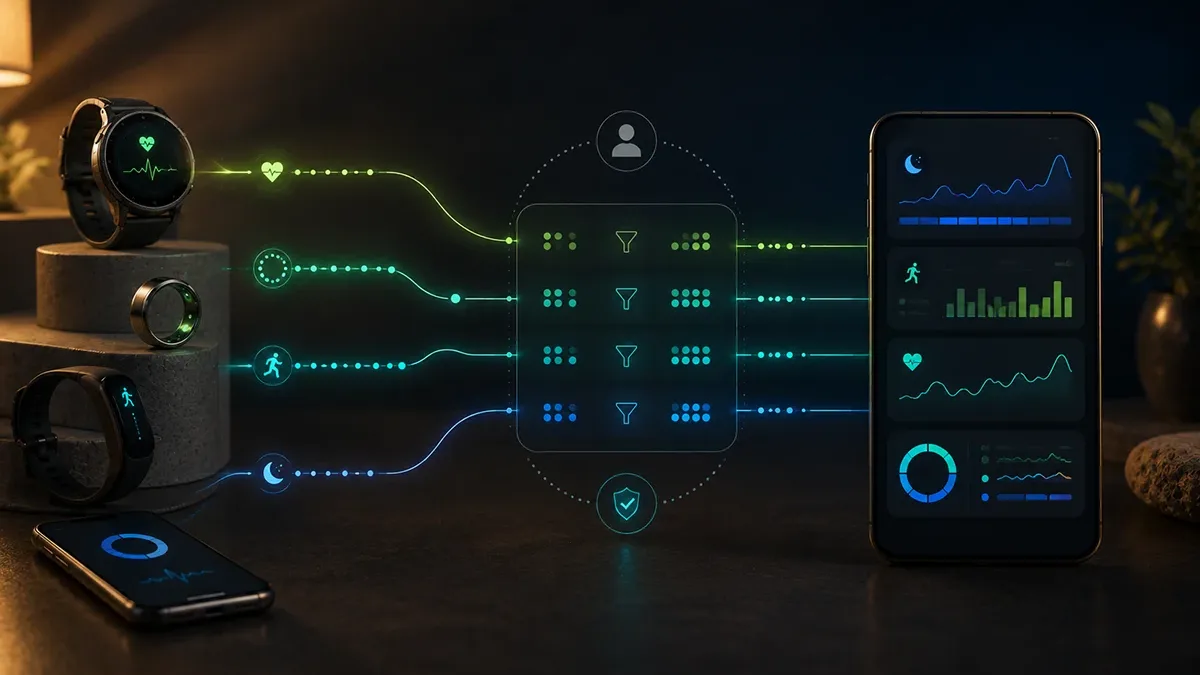
FitMesh Sync reads your wearables' data, including the Colmi ring over Bluetooth, merges it without duplicates and shows it in one web dashboard. Here's how it works, screen by screen.
TL;DR
- FitMesh Sync is an app that gathers your wearables' data and shows it in one dashboard, on your phone and on the web.
- It reads the Colmi ring directly over Bluetooth and your smartwatch through Health Connect on Android.
- It merges the sources with deduplication: when multiple devices record the same data, it picks the best value instead of adding them up.
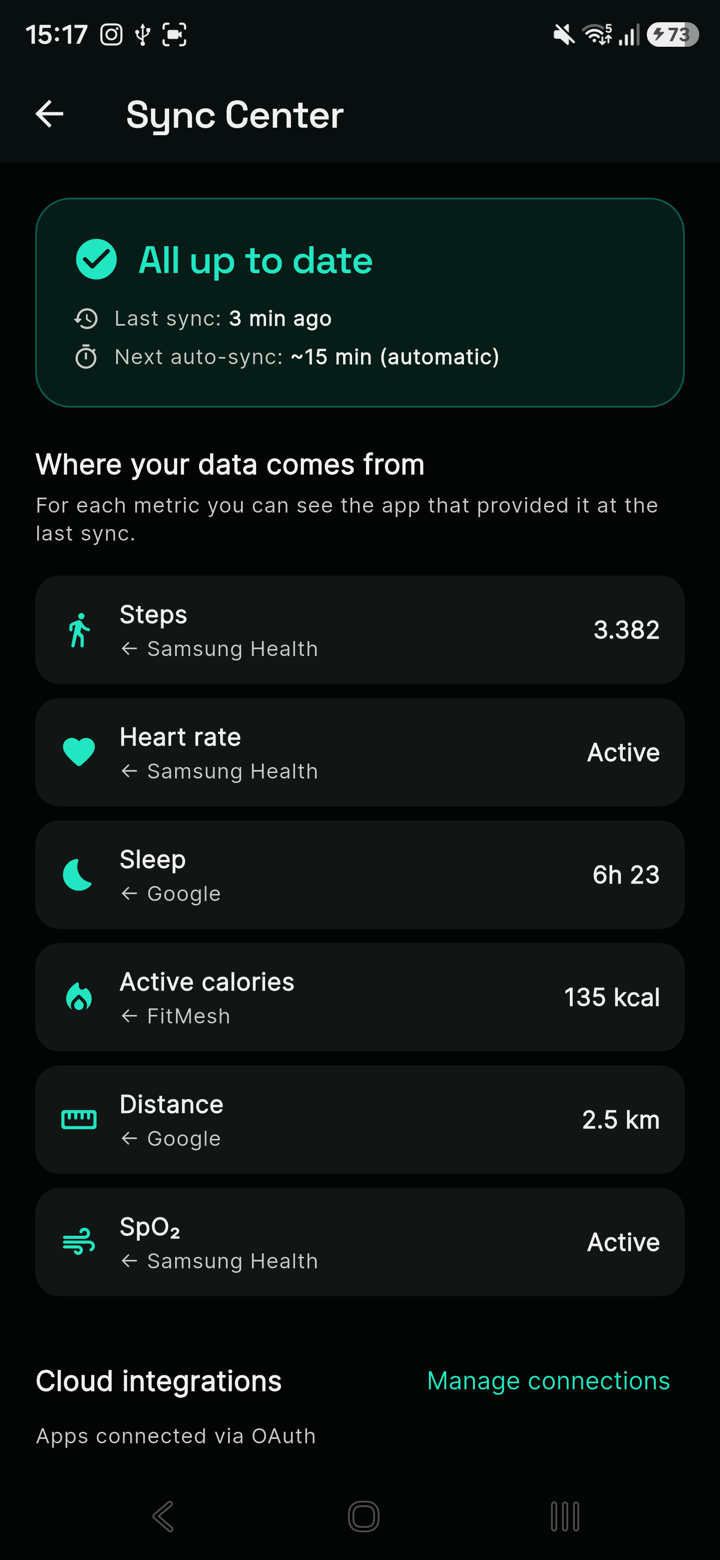
- For each metric you can see which app provided the data (steps, sleep, heart rate, SpO2).
- Your data stays on your account. Android app available now; the iOS app is already live in all supported storefronts, including the EU.
If you're wondering how FitMesh works before trying it, the one-sentence answer is this: FitMesh Sync gathers the data from all your wearables, including an affordable smart ring, merges it without duplicates and shows it to you in one dashboard, on your phone and from any browser. In this guide we go through it screen by screen, with real screenshots of the app.
What FitMesh is, in short
FitMesh Sync is a health and fitness app that bridges your wearables and a unified dashboard. Many people wear a ring at night and a watch during the day, but the data ends up in separate apps, each with its own partial view. FitMesh brings it together: one screen with steps, heart rate, sleep, SpO2, calories and workouts, no matter which device recorded them.
All your data in one dashboard
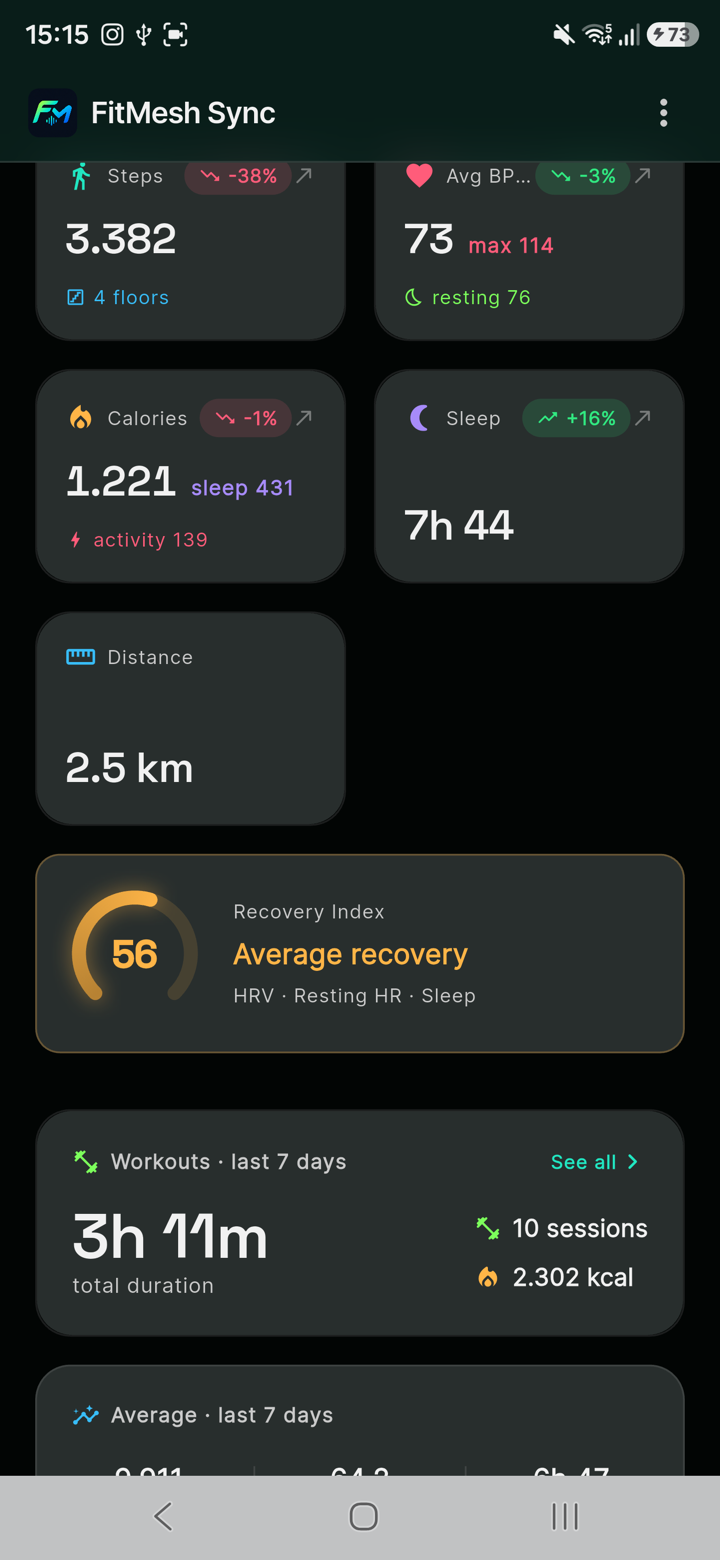
The main screen is the "Today" dashboard: each card is a metric, with the day's value and the change against your trend. At a glance you see steps, heart rate, calories, sleep, distance, a recovery index and your workout summary. No jumping between different apps.
Where the data comes from (and why there are no duplicates)
This is the part that makes FitMesh different. The Sync Center shows, for each metric, which app provided the data at the last sync: steps from Samsung Health, sleep from Google, active calories computed by FitMesh, and so on. When multiple sources record the same thing on the same day, like steps, FitMesh doesn't add the values up and doesn't simply pick the highest number: it picks the source that is most consistent and has the best hour-by-hour coverage for that day. In most cases this keeps the same step from being counted twice, but edge cases remain where two very similar sources can behave differently. You can dig deeper in multiple smartwatches together without double data.
Where each data point comes from: source, path, what it collects
FitMesh doesn't use a single channel to collect data: each type of device goes through a different technical path. Here's the full map, source by source.
- Colmi ring
- Direct Bluetooth
- FitMesh
- Android smartwatch
- Health Connect
- FitMesh
- Galaxy Watch
- Samsung Health Data SDK
- FitMesh
- Apple Watch
- Apple HealthKit
- FitMesh
- External providers
- Provider's own API
- FitMesh
| Source | Path | Data collected |
|---|---|---|
| Colmi ring | Direct Bluetooth (no intermediary) | Steps, heart rate, SpO2, sleep with stages, stress, battery |
| Android smartwatch (generic) | Health Connect | Whatever data the device writes to Health Connect |
| Samsung Galaxy Watch | Samsung Health Data SDK, a direct read-only channel, independent of Health Connect | Steps, heart rate, sleep |
| Apple Watch (iPhone) | Apple HealthKit | Steps, heart rate, sleep, workouts |
| External providers (Strava, Suunto, Oura coming soon) | The provider's own API, connected from the external providers section | Workouts and metrics specific to the connected provider |
What never reaches FitMesh
Not every metric your device measures makes it to FitMesh: it depends on what the operating system or the manufacturer's app actually exposes. A few concrete examples: Apple Health doesn't expose fine-grained HRV data to external developers, only aggregated values; Health Connect doesn't include body weight or HRV for some manufacturers; some proprietary metrics, for example fitness scores computed internally by an app, stay inside the original app and are never written to Health Connect or HealthKit, so FitMesh never sees them. FitMesh doesn't invent or estimate missing data: if a metric doesn't arrive from the OS or the provider, it simply doesn't show up.
Your smart ring, read over Bluetooth
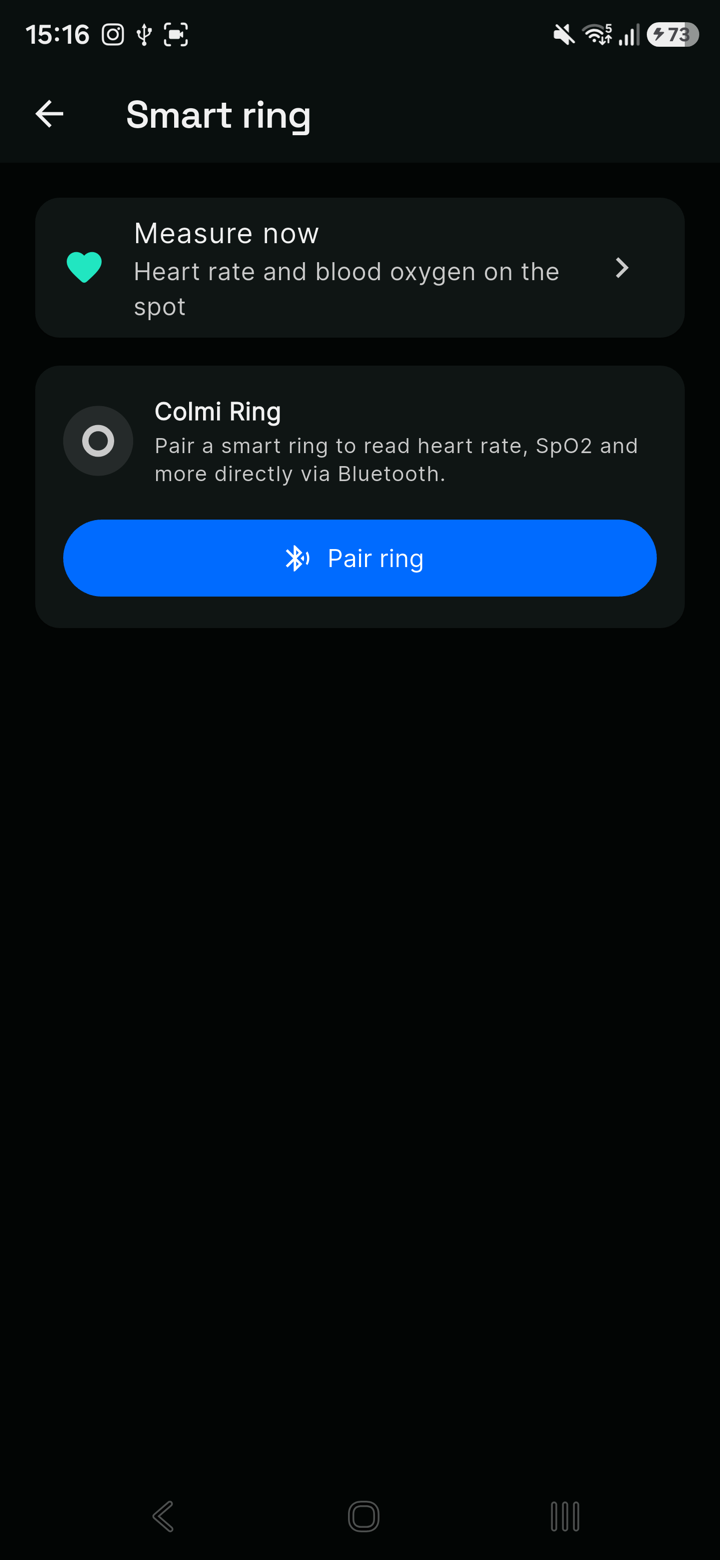
FitMesh reads the Colmi ring directly over Bluetooth, with no need to keep the maker's app open. From the "Smart ring" section you connect it and, with "Measure now", take an on-the-spot reading of heart rate and blood oxygen. The ring's data (steps, heart rate, SpO2, sleep with stages, stress, battery) flows into the same dashboard as your other devices. These are consumer wellness measurements, not diagnostic tools. Full guide: the Colmi ring with FitMesh.
Trends and history
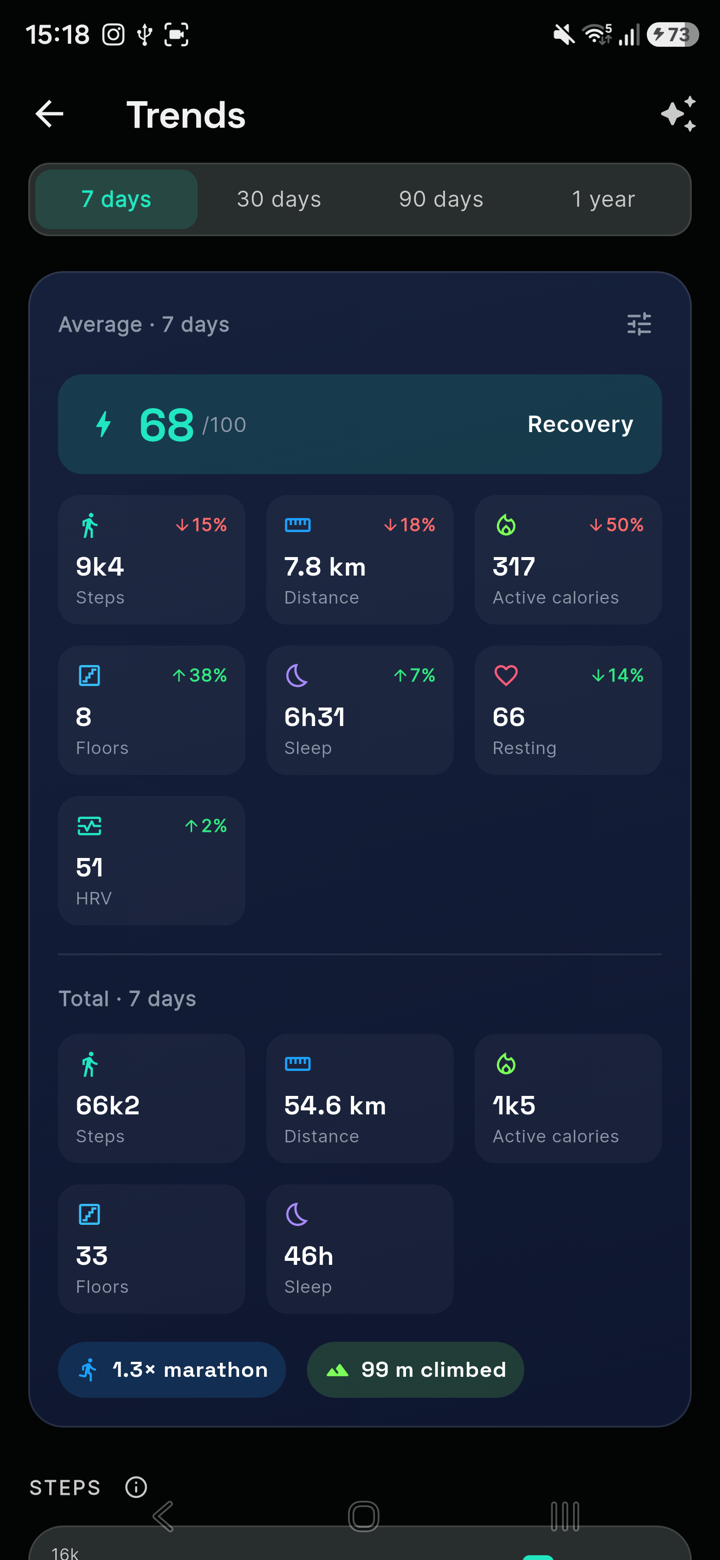
Beyond the day itself, FitMesh keeps your history. In the Trends section you pick the range (7 days, 30, 90 or a year) and see averages, totals and how each metric changes over time: steps, sleep, recovery, HRV, resting heart rate. It's the bigger picture a single manufacturer app rarely gives you.
Everything you can do
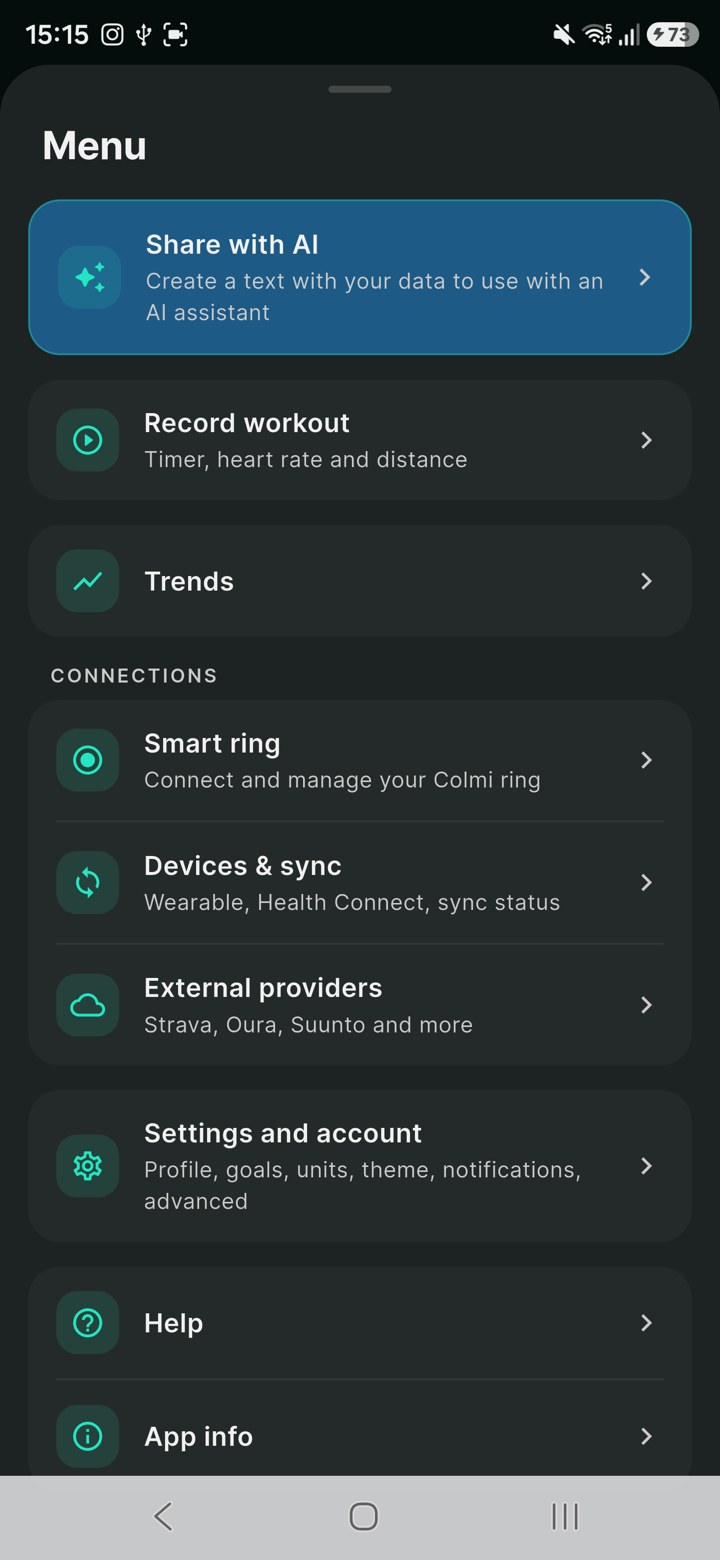
From the menu you reach every feature: record a workout with a timer, heart rate and distance; trends; connect the smart ring or manage devices and syncing via Health Connect; external providers (Strava, Oura, Suunto and more); settings for profile, goals, units and theme. There's also "Share with AI", which generates a text with your data to use with an assistant.
How to get started, in 3 steps
- Install FitMesh Sync from the Play Store and sign in. On Android you grant Health Connect access, so the app reads your smartwatch data.
- If you have a Colmi ring, open the "Smart ring" section and connect it over Bluetooth: steps, heart rate, SpO2 and sleep flow into the dashboard.
- Open the web dashboard with the same account, from any browser: you find everything merged and deduplicated, from your computer too.
Your first sync, in detail
The 3 steps above are enough to get started, but here's what actually happens on first launch. On Android, when you open FitMesh for the first time, the system asks you to authorize access to Health Connect: you choose which data categories to share (steps, heart rate, sleep, and so on), and you can change your mind at any time from your phone's Health Connect settings, not just inside FitMesh. If you have a Colmi ring, the Bluetooth connection requires the ring to be nearby and charged: the first sync of historical data, if the ring has already recorded any, can take a few minutes. On iPhone, Apple Health authorization follows the same principle: you choose which categories to share, revocable at any time from iOS Settings. In both cases, the first dashboard you see might only show the last few days of data: older history fills in over subsequent syncs, not all at once on first launch.
What it does, by platform
| Feature | Android | iPhone |
|---|---|---|
| Reads your smartwatch (Health Connect) | Yes | Yes (Apple Health) |
| Colmi ring over Bluetooth | Yes | Yes |
| Deduplication across sources | Yes | Yes |
| Web dashboard (same account) | Yes | Yes |
| Data in the cloud | Yes | Yes |
Privacy: your data in the cloud
Your health data stays on your account. FitMesh doesn't sell it and shows no ads: the service is funded by a small subscription or a one-time lifetime unlock, and the first 1,000 founder sign-ups (by July 31, 2026) got lifetime Pro free. For the details: is FitMesh free? pricing and founder spots.
Deleting your data and account
You can delete your account directly from the app: since you're already signed in on that device, deletion is immediate. Requests made from the web dashboard instead have a 24-hour grace period before they're carried out; requests by email are carried out after an identity check. FitMesh doesn't create its own database backups, but the infrastructure provider may retain technical recovery copies for up to 7 days under its own cycle; any residual data in those copies isn't used by FitMesh for normal processing. Deleting your FitMesh account doesn't touch the data that stays on connected third-party services (Health Connect, Apple Health, Samsung Health, external providers): those are managed separately, on each service. Full details on the dedicated account deletion page.
Self-hosting: the real status today
The ability to configure a custom backend (self-hosting) exists in the FitMesh software, but today it isn't a path meant for the public: it's an internal technical capability, gated to admin accounts. The fitness data write path still goes through FitMesh's managed infrastructure. It isn't a self-service alternative available today: if you want the exact current status, the dedicated page explains it in detail.
What FitMesh doesn't do
To be clear about what FitMesh doesn't do: it isn't an AI (the "Share with AI" feature only generates a text with your data, to paste into an external assistant of your choice); it doesn't diagnose anything and doesn't replace a doctor's advice; it doesn't guarantee that every possible duplicate between devices is always eliminated (deduplication covers the most common cases, it isn't infallible across every combination of sources); it doesn't automatically import every proprietary metric from every device, only what the OS or provider makes available; and it doesn't offer a self-hosting path open to the public today.
Frequently asked questions
How does FitMesh work?+
FitMesh Sync reads your wearables' data, the Colmi ring over Bluetooth and your smartwatch through Health Connect on Android, merges it with deduplication (no duplicates) and shows it in one dashboard on your phone and on the web. Your data stays on your account.
Does FitMesh really read the smart ring?+
Yes. It reads the Colmi ring directly over Bluetooth, with no need to keep the maker's app open: steps, heart rate, SpO2, sleep with stages, stress and battery. With "Measure now" you can also take an instant heart rate and blood oxygen reading.
Which devices does it work with?+
On Android, with any device that writes to Health Connect (most recent smartwatches and bands), plus the Colmi ring over Bluetooth. Providers like Strava and Suunto connect from the external providers section (Oura is coming soon). On iPhone the app is already live and reads Apple Health directly, plus connects to the Colmi ring over Bluetooth.
Do I need Health Connect?+
On Android yes, to read your smartwatch data: on first launch you grant FitMesh access in Health Connect. The Colmi ring, instead, is read directly over Bluetooth, without Health Connect.
How does deduplication across sources work?+
Because FitMesh applies deduplication: if the same metric arrives from multiple sources in the same interval (for example ring and watch), it picks the best value instead of adding them up. In the Sync Center you see, for each metric, which app it comes from.
Where is my data stored?+
On your account. FitMesh doesn't sell your data and shows no ads. You can open the same dashboard from any browser with your account.
Is FitMesh free?+
There's no permanent free plan, but it costs very little: a full 14-day trial, then a light subscription (about a coffee every six months) or a one-time lifetime unlock (less than a pizza). The first 1,000 founder sign-ups (by July 31, 2026) got lifetime Pro free.
Does it work on iPhone?+
Yes. The Android app is available now and the iOS app is already live on the App Store in all supported storefronts, including all 27 EU countries; on iPhone it reads Apple Health directly. The web dashboard, however, is already accessible from any device with your account, iPhone included.
Does FitMesh always eliminate every duplicate between devices?+
In most cases, yes: when multiple devices record the same data in the same interval, deduplication picks the best value instead of adding them up. It isn't an absolute guarantee across every possible combination of sources, though: edge cases, for example very close but not identical time intervals, can behave differently.
Can I delete my account and data?+
Yes, directly from the app: deletion from your phone is immediate. Requests from the web dashboard have a 24-hour grace period; requests by email are carried out after an identity check. Full details on the [account deletion page](/en/delete-account).
Can I run my own backend (self-hosting)?+
The capability exists in the software, but today it isn't a path meant for the public: it's restricted to admin accounts, and the fitness data write flow still goes through FitMesh's infrastructure. See the [current self-hosting status](/en/self-host).
Is FitMesh an AI?+
No. FitMesh is a data sync and visualization app: it merges and displays your metrics, it doesn't interpret them with AI models. The "Share with AI" feature only generates a text with your data to paste into an external assistant of your choice, if you want to.
Disclaimer
FitMesh Sync is an independent product. Colmi, Samsung Health, Google are trademarks of their respective owners. This article implies no affiliation or sponsorship.
Medical disclaimer
The information in this article is for informational purposes only and does not replace advice from your physician, pharmacist or healthcare professional. FitMesh Sync is a fitness/wellness app, not a medical device, and does not diagnose or treat any conditions. For symptoms, clinical questions or treatment decisions always consult your primary care physician.
Written by
Matteo Pizzi
Founder & Solo Dev, FitMesh Sync · Fosforonero
Italian software developer. I built FitMesh Sync to fill the gap between my smartwatch and a real personal dashboard. Privacy-first, indie.
More about the projectKeep reading
Guide
Colmi R02: the €25 smart ring that finally syncs all your health data
The Colmi R02 measures steps, heart rate, SpO2, HRV, stress and battery. The catch: data is locked inside the manufacturer's companion app. FitMesh Sync connects directly over Bluetooth and merges everything into your dashboard, no companion app required.
Guide
Health Connect Duplicate Steps and Workouts: 7 Fixes
The quick solution: identify which apps write the same data, assign the correct priority for Activities and Sleep, break any synchronization loops, and only then delete the incorrect copies. Steps and workouts are not handled in the same way: this guide shows exactly where to intervene.
Guide
How Health Connect works: the complete guide for Android
Health Connect is not just an app: it's the data exchange layer that lets all Android health apps communicate. Here's what it actually does, how it manages your permissions, and what happens when something doesn't work.