
User guide
Your smart ring data inside Apple Health: how the bridge works
If you have a smart ring or Galaxy Watch paired with Android, their data doesn't automatically reach Apple Health on your iPhone. FitMesh Sync fixes this with an opt-in cloud bridge: here's what to activate, what shows up on iPhone, and answers to the most common questions.
TL;DR
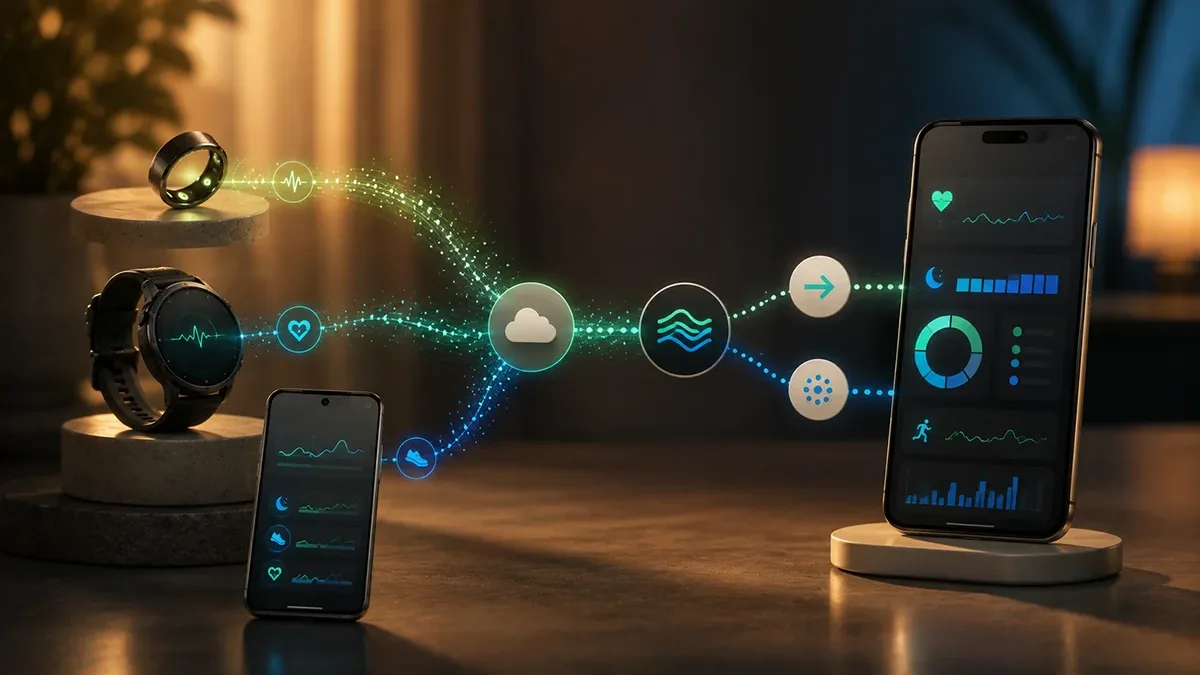
- FitMesh Sync reads data from your smart ring or Android smartwatch, syncs it to the cloud, and writes it into Apple Health via HealthKit: so users with two phones see everything in one place.
- The bridge is opt-in: if Apple Health already has that data (for example from Apple Watch), FitMesh won't rewrite it. No duplicates.
- Sleep with full stages (deep, light, REM): the ring is a nighttime specialist and stages are written to Apple Health exactly as recorded by the sensor.
- Privacy: all data transits through the cloud. FitMesh doesn't sell data or use it to train models.
- The bridge runs when you open FitMesh (not in true background): no manual exports, no manufacturer companion app required on iPhone.
I found this personally annoying: Galaxy Watch on the wrist, iPhone in the pocket, and the Health app only showing iPhone data. The ring I wear at night records detailed sleep stages, but Apple Health doesn't see them. FitMesh's Apple Health write bridge was born from this concrete need, not from a feature checklist.
The problem: two ecosystems that don't talk to each other
Android and iOS use separate, non-interoperable health data repositories: Health Connect on Android, HealthKit on iOS. A Galaxy Watch paired with an Android phone writes data to Health Connect, not Apple Health. A Colmi ring read via Bluetooth by FitMesh on Android does the same. Result: if you open the Health app on your iPhone, that data isn't there.
How the bridge works: step by step
- Collection on Android: FitMesh Sync reads data from your Android wearable (via Health Connect for Galaxy Watch, via Bluetooth for the Colmi ring) and uploads it to the cloud.
- FitMesh cloud: data is archived with timestamp, source, data type and user account. The cloud normalizes formats across different sources.
- iOS app active: when you open FitMesh on iPhone (or the app is active in background), it checks what data is available in the cloud for your account.
- Duplicate check: for each available piece of data, the app checks whether Apple Health already has something for that time slot. If yes, it skips. If no, it writes.
- Targeted writing: writes to Apple Health only the missing data. If Apple Watch has already recorded sleep from 11pm to 7am, FitMesh doesn't touch those hours.
- Immediate visibility: after writing, data appears in the iPhone Health app like any other HealthKit entry, with the source clearly shown as FitMesh Sync.
No duplicates: how it works
Before writing any data, FitMesh checks whether Apple Health already has something for that time slot. If yes, it moves on. If no, it writes. In practice: there are never two entries for the same hour.
Sleep with stages: the ring's strong point
Smart rings like the Colmi R02/R03 are built for nighttime: they measure sleep, SpO₂, heart rate and variability while you sleep, without the bulk of a watch on your wrist. The stages recorded by the ring (deep, light, REM, awake) show up in Apple Health in the Sleep chart, just as if Apple Watch had recorded them.
Privacy: where data goes and who sees it
Data takes just two steps: from the FitMesh app on Android to the FitMesh cloud (datacenter, encrypted), then from the FitMesh app on iPhone into Apple Health on your device. FitMesh doesn't sell data to third parties, doesn't use it to train models, doesn't share it with advertisers.
How to activate the bridge
- Install FitMesh Sync on iPhone from the App Store (available, including all European Union storefronts).
- Sign in with the same account you use on Android.
- Go to Settings → Apple Health → Write Bridge.
- Toggle it on and grant the requested HealthKit permissions.
- Choose which data types you want the bridge to write (sleep, steps, heart rate, etc.).
- FitMesh syncs available data and writes it to Apple Health within minutes.
What the bridge does NOT do: no direct Apple Watch integration
The bridge described in this guide works in one direction only: data from an Android device (Galaxy Watch, Wear OS, a Colmi ring connected via Android) into Apple Health on iPhone, via the FitMesh cloud. It never reads data from Apple Watch: if you own an Apple Watch, it already writes natively and directly into Apple Health through iOS, no bridge needed. FitMesh has no Apple Watch app and offers no way to get Apple Watch data onto Android or anywhere else: that direction is out of scope, today and by design (Apple doesn't expose an equivalent outbound path from HealthKit to third-party apps on other platforms).
Where each data point comes from: the full map
| Scenario | Path | Goes through the FitMesh cloud bridge? |
|---|---|---|
| Apple Watch | Native, direct into HealthKit (iOS) | No — not needed, Apple already does this |
| Colmi ring + iPhone only (no Android) | Direct Bluetooth, FitMesh Sync iOS → HealthKit | No — direct connection, the bridge isn't involved |
| Galaxy Watch / Wear OS + Android + iPhone | Health Connect (Android) → FitMesh cloud → HealthKit | Yes — this is the bridge described in this guide |
| Colmi ring + Android + iPhone | Bluetooth (Android) → FitMesh cloud → HealthKit | Yes — this is the bridge described in this guide |
Apple Health features the bridge doesn't replicate
Apple Health is more than a metrics container: it includes features FitMesh doesn't attempt to replicate, by choice and because they require system-level access a third-party app doesn't have.
- Medical ID: emergency data visible from the lock screen (allergies, conditions, contacts) stays a native Apple feature, configured inside the Health app itself.
- Health Records: importing clinical documents and medical history from connected hospitals/pharmacies remains a direct channel between Apple and healthcare providers, not something FitMesh can replicate.
- Medications and reminders: managing treatments and dose reminders is a native Health app feature, not data the bridge writes.
- Menstrual cycle tracking: a native feature handled entirely inside Apple Health; the bridge neither reads nor writes this data.
- Native Apple Watch health notifications: irregular heart rhythm alerts, fall detection, ECG require the hardware and firmware of a physical Apple Watch — a data bridge can't generate them.
- Health Sharing with family members remains a native Apple feature, independent of FitMesh.
- Structured diagnostic/clinical data (lab reports, imaging) never passes through the ring or the smartwatch in the first place, so it doesn't arrive via the bridge either.
Other honest limits of the bridge
- HRV isn't written by the bridge: heart rate variability calculation methods differ between sources (RMSSD on the ring/Health Connect side vs Apple Watch/HealthKit's native SDNN) — writing it would risk showing an inconsistent number next to any Apple Watch value, so it's not written today.
- No Apple Watch companion app: the bridge has no watchOS extension and none is planned.
- Write-only, never read: the bridge doesn't carry Apple Watch data written into Apple Health back out to Android — it's a one-way path.
- Not real-time: writing happens when you open the FitMesh app on iPhone, not in true continuous background (a limit of HealthKit APIs for third-party apps, not a FitMesh design choice).
Who doesn't need this bridge
- Anyone with only an Apple Watch (no Android device): the data is already native in Apple Health, the bridge adds nothing.
- Anyone with a Colmi ring but no Android phone: it connects directly to FitMesh on iPhone over Bluetooth, without going through the bridge's cloud (see the box above).
- Anyone who never opens the iPhone Health app: the bridge writes data they'll never look at — no harm, but no benefit either.
- Anyone looking for clinical features (Medical ID, health records, medications, cycle tracking): those stay natively inside Apple Health, the bridge doesn't touch them (see section above).
In summary
- The Apple Health write bridge brings Android device data (smartwatches, smart rings) into HealthKit on iPhone via FitMesh cloud.
- Checks first whether Apple Health already has that data. Writes only where something is missing. No duplicates.
- Sleep with full stages (deep, light, REM): ring stages appear in Apple Health in the same format as Apple Watch.
- Opt-in, granular, revocable: activated from FitMesh iOS settings and turned off at any time. HealthKit permissions are managed from iPhone Settings.
- Privacy: datacenter cloud, encrypted, no data sales or third-party sharing.
Sources
- Source 1 · developer.apple.com
- Source 2 · developer.apple.com
Frequently asked questions
Does the bridge overwrite data already in Apple Health?+
No. FitMesh checks first whether Apple Health already has something for that time slot. If there's already data there (from Apple Watch or any other app), FitMesh doesn't touch it. It never overwrites existing data.
Which data types get written to Apple Health?+
Depends on the sources you've connected on Android and the permissions you've granted. Supported types today include: sleep with stages (deep, light, REM, awake), steps, heart rate (samples), active calories, distance. You can choose granularly which types to enable for the bridge in FitMesh iOS settings.
Does it work even if I don't have a Colmi smart ring?+
Yes. The bridge works with any device connected to your FitMesh account on Android: Galaxy Watch, Wear OS, any wearable writing to Health Connect. The Colmi ring is an example of a device particularly useful for the bridge because it specializes in nighttime sleep, but it's not the only compatible one.
Is data updated in real time?+
The path is: the Android phone syncs data to the FitMesh cloud (the cadence depends on the phone and its battery-saving settings), then the iPhone app writes it to Apple Health the next time it opens. It's not real-time, but it's automatic: with no manual export, the previous night's data is in Apple Health moments after you open the app in the morning.
How is the data shown in Apple Health?+
Data written by the bridge appears in the Health app exactly like any other HealthKit entry: with timestamp, data type, and source. The source listed is 'FitMesh Sync'. You can see them in the Sleep chart, in Summary, and in individual categories (Steps, Heart Rate, etc.). You can also remove them from Apple Health at any time if you decide to turn off the bridge.
Disclaimer
FitMesh Sync is an independent product. Apple, Samsung are trademarks of their respective owners. This article implies no affiliation or sponsorship.
Medical disclaimer
The information in this article is for informational purposes only and does not replace advice from your physician, pharmacist or healthcare professional. FitMesh Sync is a fitness/wellness app, not a medical device, and does not diagnose or treat any conditions. For symptoms, clinical questions or treatment decisions always consult your primary care physician.
Written by
Matteo Pizzi
Founder & Solo Dev, FitMesh Sync · Fosforonero
Italian software developer. I built FitMesh Sync to fill the gap between my smartwatch and a real personal dashboard. Privacy-first, indie.
More about the projectKeep reading
Ecosystem
FitMesh Sync arrives on iPhone
After months of development, the iOS app is now live on the App Store, available in all supported storefronts, including all European Union storefronts. One account, Android and iPhone together. And a new feature: your Android wearable data written directly into Apple Health.
Guide
Colmi R02: the €25 smart ring that finally syncs all your health data
The Colmi R02 measures steps, heart rate, SpO2, HRV, stress and battery. The catch: data is locked inside the manufacturer's companion app. FitMesh Sync connects directly over Bluetooth and merges everything into your dashboard, no companion app required.
Guide
How Health Connect works: the complete guide for Android
Health Connect is not just an app: it's the data exchange layer that lets all Android health apps communicate. Here's what it actually does, how it manages your permissions, and what happens when something doesn't work.